


- Home
- User Guide
- Affiliate Program
- Tracking Referrals & Payouts
To help you understand exactly how the referral tracking system works, let’s look at a practical example.
– The Scenario
- Muhammed is an active affiliate who shares his referral link.
- Ahmed clicks the link, registers for a new account, and selects the SPARK plan.
- Ibrahim clicks the link, registers for a new account, and selects the INFINITY plan.
Let’s explore how the referral system works at each stage of the referral process.
Phase 1: The “Pending” State
(Registered but Not Activated)
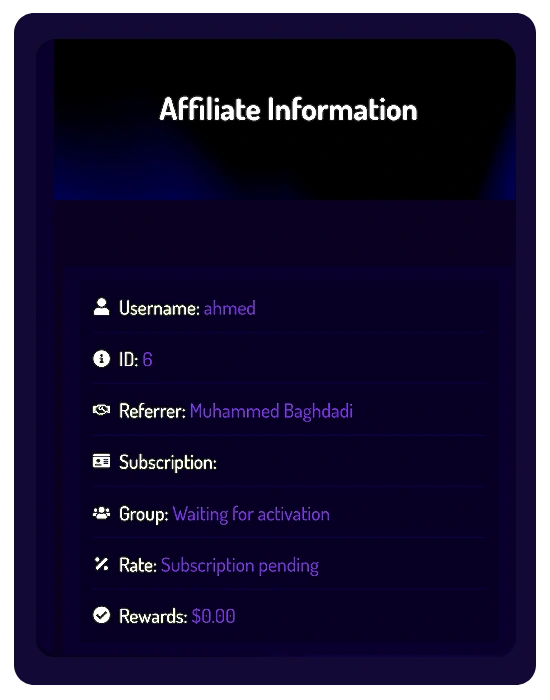
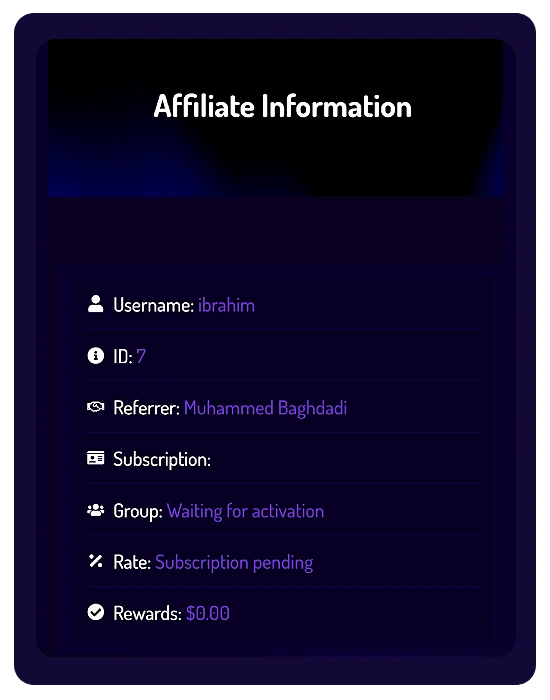
When Ahmed and Ibrahim complete their initial registration, their accounts are created, but their subscriptions are not yet active.
Here is how this appears on both sides of the platform.
1️⃣ What the New Members See (Ahmed & Ibrahim)
If Ahmed and Ibrahim visit:
- Dashboard → Affiliate Info
they will see their accounts in a pending activation state.
- Under Group, the status will display:
Waiting for activation - Under Rate, the status will display:
Subscription pending
- Under Group, the status will display:
Their accounts will remain in this state until their subscriptions are successfully activated in accordance with the platform’s Affiliate Program policies.
2️⃣ What the Referrer Sees (Muhammed)
Muhammed can monitor referral activity even before subscriptions become active.
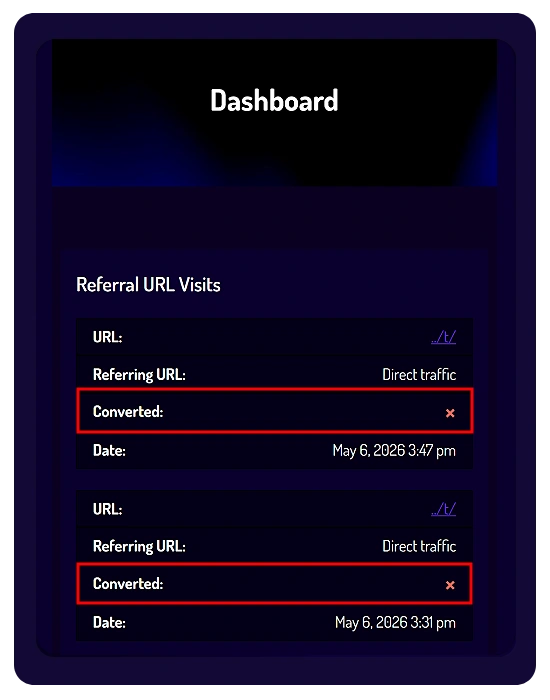
- Dashboard → Visits
Muhammed will see visits recorded whenever someone clicks his referral link.
- A visit is recorded whenever someone clicks your referral link.
- A recorded visit does not automatically mean that registration or subscription activation was completed.
- Converted Column
- Inside the Visits table, Muhammed will notice a red “×” under the Converted column.
- In this example, the red “❌” means that Ahmed and Ibrahim completed registration, but their subscriptions have not been activated yet.
- Once a referred user successfully activates their subscription, the red “❌” will automatically change into a green “”.
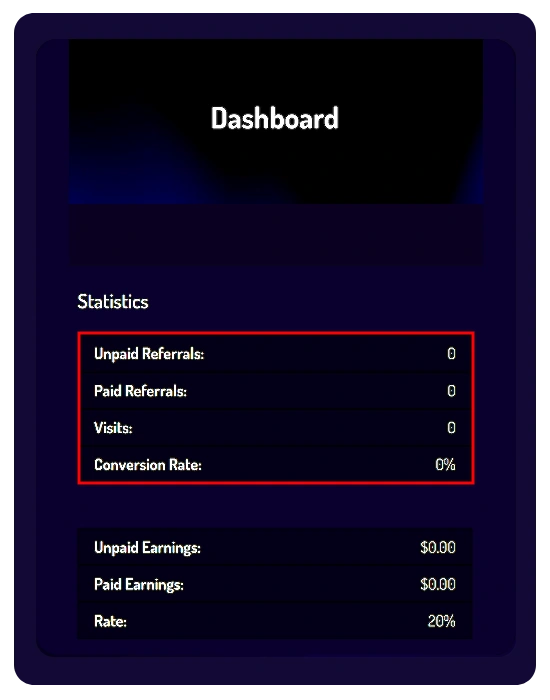
- Dashboard → Referrals / Referral Payouts / Statistics
- Because affiliate tracking is finalized only after subscription activation, Muhammed will not see any new referral records, payout data, or updated statistics at this stage.
- These sections are updated only after a successful subscription activation.
Phase 2: The “Complete” State
(Subscriptions Successfully Activated)
- Once Ahmed and Ibrahim successfully complete their subscription payments, Thera will begin processing their subscription activation.
- Activation is typically completed within a few hours, but in some cases it may take up to 24 hours.
- Once activation is successfully completed, the referral process is considered successful, and Muhammed’s Affiliate Dashboard will automatically update to reflect the completed referrals and related Referral Rewards.
1️⃣ What the New Members See (Ahmed & Ibrahim)
If Ahmed and Ibrahim visit:
- Dashboard → Affiliate Info
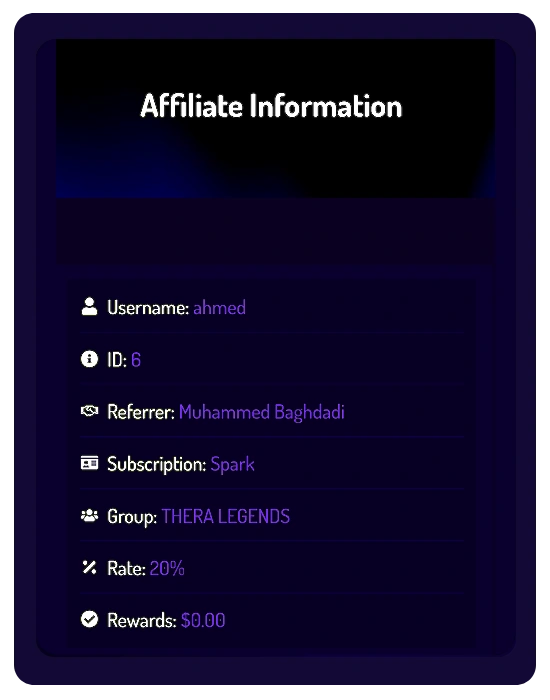
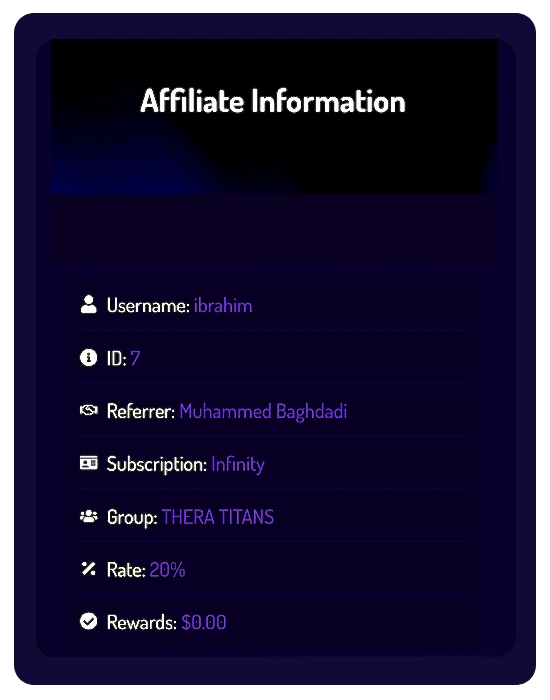
they will now see their subscription details displayed as fully active.
Their Affiliate Info will update as follows:
- Under Subscription, their selected plan will appear:
- Ahmed → SPARK
- Ibrahim → INFINITY
- Under Group, the pending status will be replaced with their active membership group:
- Ahmed → THERA LEGENDS
- Ibrahim → THERA TITANS
- Under Rate, the Affiliate Rate will display:
- 20%
- Under Subscription, their selected plan will appear:
This confirms that their subscriptions were successfully activated and linked to Muhammed’s referral account.
2️⃣ What the Referrer Sees (Muhammed)
Muhammed’s Affiliate Dashboard will automatically update across multiple sections after the subscriptions become active.
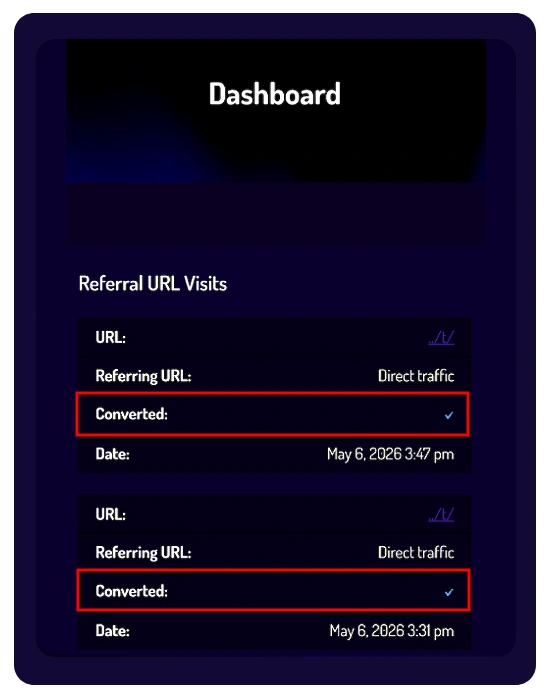
- Dashboard → Visits
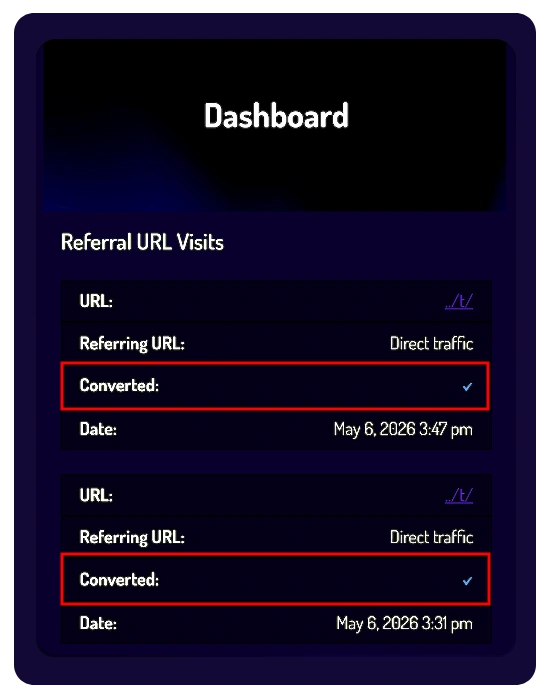
- Inside the Visits table, the red “❌” under the Converted column will automatically change into a green “”.
- In this example, the green “” confirms that Ahmed and Ibrahim successfully activated their subscriptions after visiting Muhammed’s referral link.
- Conversion Rate: will automatically update based on successful subscription activations.
Examples:
- 2 recorded visits → 2 successful activations = 100% Conversion Rate
- 2 recorded visits → 1 successful subscription activation = 50% Conversion Rate
⚠️ Important:
- A recorded visit alone does not mean a successful referral.
- A referral is only considered converted after the referred user successfully activates a paid subscription.
- Dashboard → Referrals
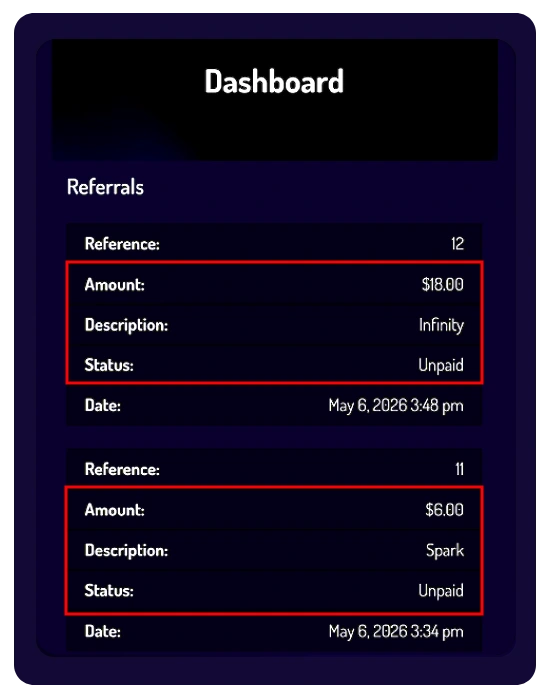
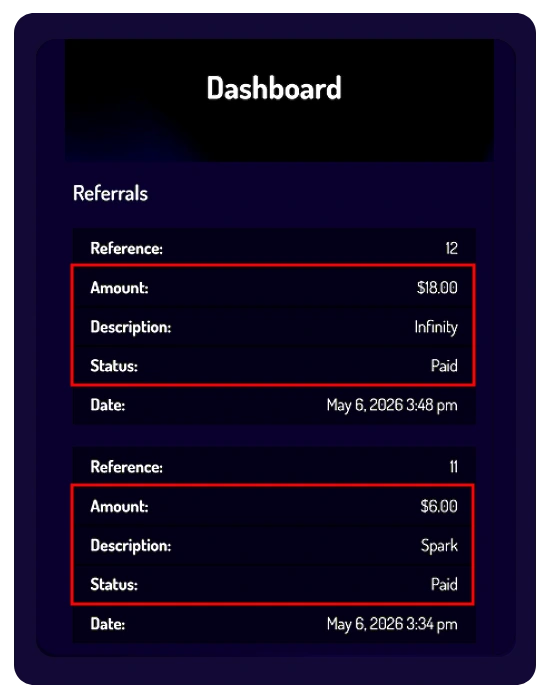
New records will appear inside the Referrals section once the referred subscriptions are successfully activated.
These Referral Rewards are generated using the platform’s fixed 20% Referral Reward Rate based on the referred subscription plan.
The records will include:
- Reward Amount
- Subscription Type
- Reward Status
- Date
Reward Status: “Unpaid”
In this example, the rewards are currently marked as Unpaid.
This means:
- The referral process was successfully completed.
- The Referral Rewards were successfully recorded by the system
- The payout has not been processed yet
Rewards remain subject to the platform’s validation, fraud prevention, and payout eligibility policies.
- Dashboard → Statistics
The Statistics section will now reflect the successful referral activity.
Muhammed will see updates such as:
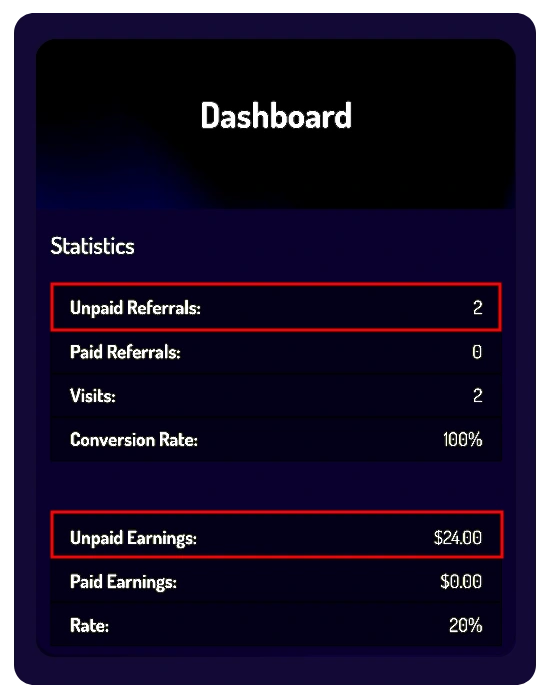
- Increased number of Unpaid Referrals
- Updated Conversion Rate
- Updated Unpaid Earnings
- Total successful referral visits
In this example:
- Unpaid Referrals: 2
- Conversion Rate: 100%
- Unpaid Earnings: Updated automatically based on the activated subscriptions
Phase 3: The “Paid” State
(Referral Rewards Successfully Processed)
This phase applies exclusively to the referrer (Muhammed) and explains what happens after Referral Rewards are successfully processed for payout according to the platform’s payout schedule and eligibility requirements.
What the Referrer Sees (Muhammed)
- Dashboard → Visits
- Inside the Visits section, the converted referrals will remain marked with a green “”.
- In this example, the green “” confirms that the referred subscriptions were successfully activated and approved under the platform’s Affiliate Program requirements.
- Dashboard → Referrals
– Inside the Referrals section, the Reward Status for the related referral records will update from “Unpaid” to “Paid”.
– This status update confirms that the Referral Rewards related to the activated SPARK and INFINITY subscriptions were successfully processed during the payout cycle.
– In this example, the Referral Rewards were generated using the platform’s fixed 20% Referral Reward Rate:
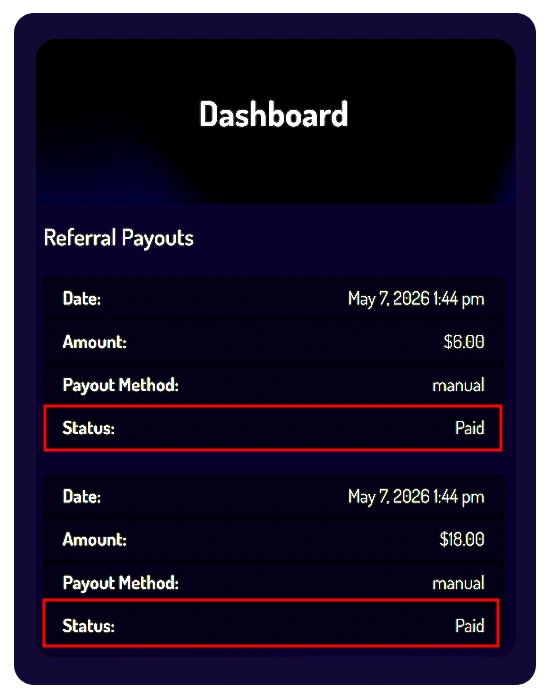
- SPARK Subscription → $6.00 Referral Reward
- INFINITY Subscription → $18.00 Referral Reward
– The referral records will continue to display:
- Reward Amount
- Subscription Type
- Reward Status
- Date
- Dashboard → Statistics
– The Statistics section will automatically update to reflect the completed payout process.
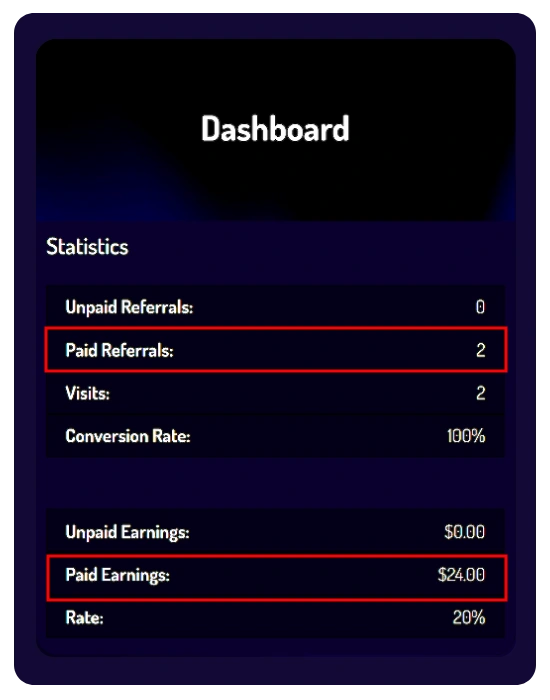
– In this example:
- Unpaid Referrals → 0
- Paid Referrals → 2
- Unpaid Earnings → $0.00
- Paid Earnings → $24.00
– The Conversion Rate will remain based on the successfully activated referrals.
- Dashboard → Referral Payouts
– Once Referral Rewards are processed, Muhammed can visit the Referral Payouts section to review his payout history.
– This section displays detailed payout records associated with the wallet address previously added to his account.
– Each payout record may include:
- Date
- Amount
- Payout Method
- Payout Status
– In this example, the payout records display the status: “Paid”
– This confirms that the Referral Rewards were successfully processed for payout and marked as “Paid” during the payout cycle.
Important Note Regarding Example Dates
– The payout dates shown in this example are provided for demonstration purposes only.
– Official Referral Reward payouts are scheduled to be processed automatically once per month, between the 20th day and the end of the calendar month, provided all payout requirements and eligibility conditions are successfully met.
Phase 4: The “Rejected” State
(Referral Rewards Rejected or Disqualified)
The “Rejected” status is part of the platform’s Affiliate Program protection and compliance system.
This status may appear when a referral or Referral Reward does not meet the platform’s eligibility requirements, validation standards, or Affiliate Program policies.
What the “Rejected” Status Means:
A referral marked as “Rejected” indicates that the related Referral Reward was not approved for payout processing.
In such cases:
- The related Referral Reward may be canceled or removed from the affiliate records.
- The related referral may no longer qualify as an eligible referral under the Affiliate Program rules.
- Rejected Referral Rewards will not be included in future payout cycles.
Possible Reasons for Rejection:
Referral Rewards may be rejected, withheld, canceled, or disqualified for reasons including, but not limited to:
- Violations of the Affiliate Program rules
- Suspicious or abnormal referral activity
- Multiple account abuse
- Invalid or ineligible subscriptions
- Fraud prevention or compliance review results
- Violations of the platform’s Terms of Service or policies
- Attempts to manipulate the referral system
- Any activity considered harmful to the platform or community
Compliance & Validation Review:
All Referral Rewards remain subject to internal validation, eligibility checks, fraud prevention procedures, and compliance review before payout processing.
Thera reserves the right to:
- Delay payout processing for verification purposes
- Reject or disqualify suspicious referrals
- Withhold or cancel Referral Rewards when necessary
- Restrict participation in the Affiliate Program
- Suspend or terminate related accounts in serious violation cases
Important Notice:
- The platform’s compliance and validation decisions regarding Referral Rewards, payout eligibility, and Affiliate Program participation are considered final and binding in accordance with the platform’s Terms and policies.
- Members are fully responsible for ensuring that all referral activity complies with the official Affiliate Program rules and platform requirements.
Important Payout Information
1. Payout Schedule
Referral Rewards are scheduled to be processed automatically once per month, between the 20th day and the end of the calendar month, provided the minimum payout requirement is met.
2. Minimum Payout Requirement
A minimum balance of $40 USD in Referral Rewards is required before a payout can be processed.
3. Payment Method
All payouts are issued exclusively in USDT via ( the TON Network ).
4. Wallet Address Responsibility
Members are fully responsible for providing a correct and compatible wallet address.
To receive payouts successfully:
- Your wallet address must be added or updated before the 15th day of the payout month
- Wallet updates submitted after this date will automatically apply to the next payout cycle
- ⚠️ Incorrect wallet addresses may result in failed or lost payouts
5. Adding Your Wallet
For detailed instructions on how to add or update your wallet address, please review the:
🔗 Adding Your Wallet for Payouts
6. Subscription Expiration & Grace Period
If your 6-month subscription cycle expires, you immediately lose the right to generate new referrals. However, any valid rewards earned and cleared during your active subscription period will still be processed in the upcoming monthly payout cycle, provided you track them within your 30-day account grace period. After this 30-day period, login access is disabled and any remaining unpaid or uncleared rewards are permanently forfeited.